
A Conversation is a project-level chat group for discussions related to a project — a dedicated place for project communication instead of moving the discussion outside the project. Every project has a default General conversation, and separate threads can be created for focused topics.
Prefer to watch?
Watch the video for this guide (1:29)
1. What Are Conversations?
Conversations are project-level chat groups used for discussions related to a project. They keep project communication in one dedicated place instead of moving discussions outside the project.2. Where to Find Conversations
Open the required Project and select the Conversations tab from the project navigation.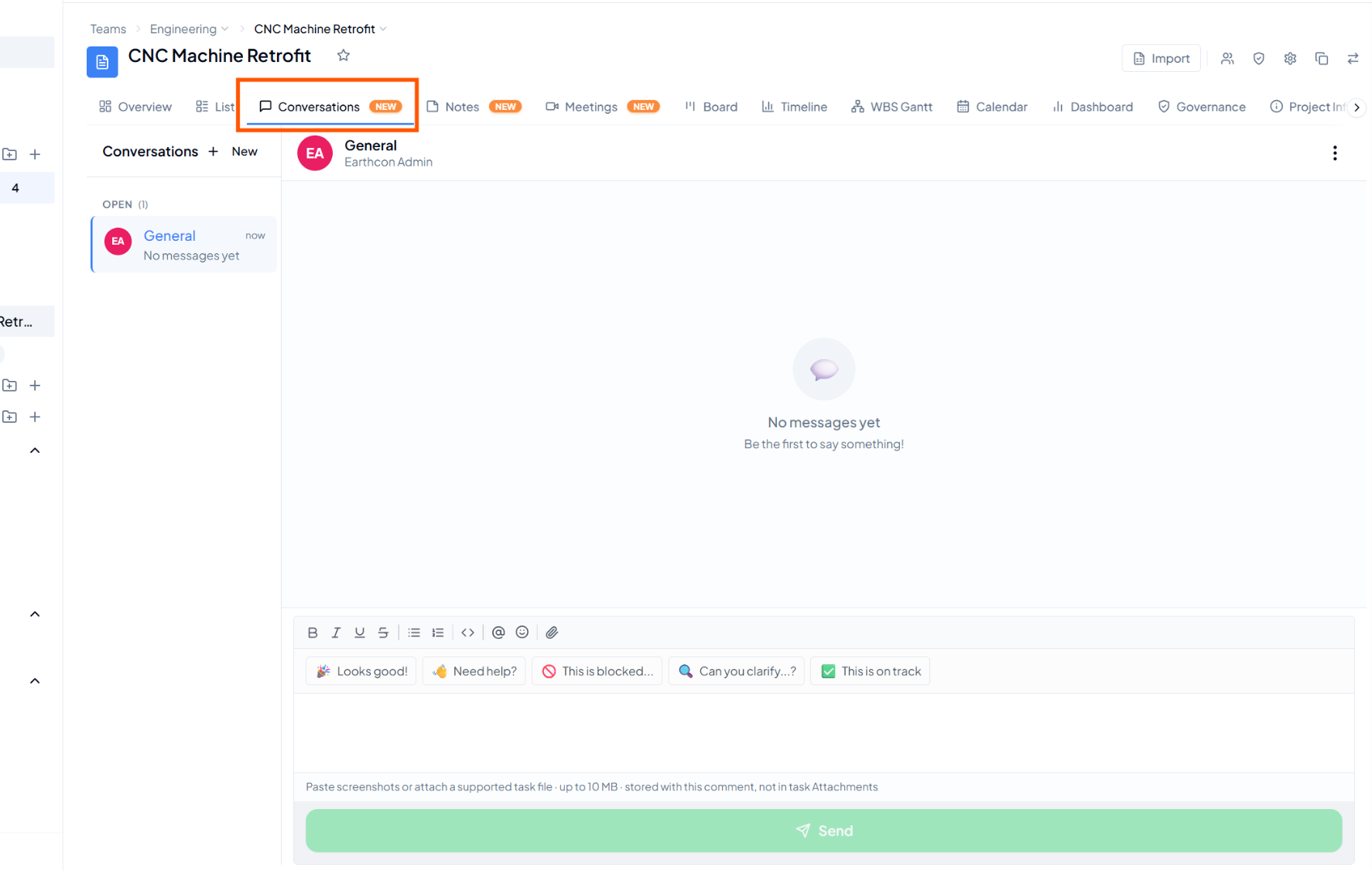 Conversations tab inside a project, with the default General
conversation and message area.
Conversations tab inside a project, with the default General
conversation and message area.
3. The General Conversation
Watch: Project Conversations
in the Video Gallery — using project-level conversations to discuss
work right alongside the task.
Visibility Across the Product
Conversation visibility is one instance of a broader pattern — who can see a workspace, project, or task depends on a chain of settings at each level. The visibility gate chain, from workspace down to an individual project.