
An Approval Line determines whether a task needs sign-off before it can be closed, and who that sign-off comes from — None, Reporter Approval, or a specific Direct Approver set when the task is created.
1. Where to Find Approval Requests
Approval requests are available from My Tasks → Approvals. The number shown beside Approvals indicates requests waiting for action. My Tasks → Approvals.
2. When Is an Approval Request Created?
1
Approval Line is defined
While creating the task, choose None, Reporter Approval or Direct
Approver.
2
Task work is completed
The task owner completes the required work and adds the comments or
attachments needed for review.
3
Task is sent for approval
The task owner changes the status to Approval Required. The request
is then sent to the configured approval line.
3. Select the Approval Line While Creating a Task
Use the Approval Line field in the Create New Task form to define whether the task needs approval before closure.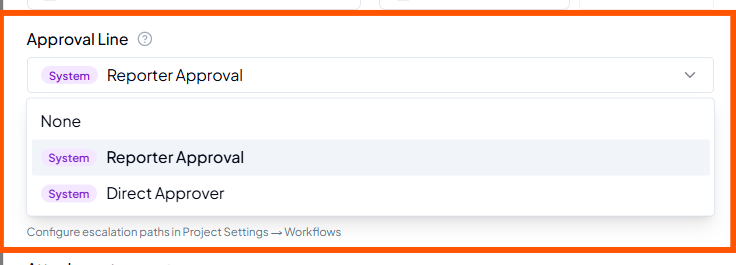 Approval Line options in the Create New Task form.
System behaviour
As described in the current workflow, if the configured approver and the Reporter are the same person, the task is auto-approved.
4. Send a Completed Task for Approval
Before requesting approval, add all required work details, comments and supporting attachments. Then change the task status to Approval Required.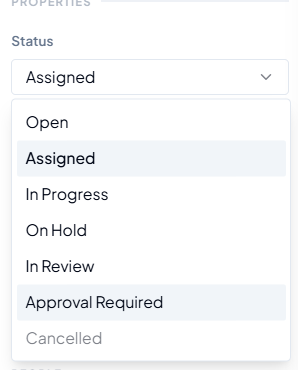 Status → Approval Required.
1
Complete the work
Finish the task and ensure the expected output is ready.
2
Add review evidence
Add the comments, notes and attachments needed for review.
3
Choose Approval Required
Open Status and select Approval Required.
4
Approval is triggered
The request is sent to the approver defined in the Approval Line.