
1. Approvals
What is this?
Approvals shows tasks that are waiting for an approval action from you. The view includes Pending approvals and a History area for previously processed approvals.Why is this helpful?
- Review approval requests across projects from one place.
- Reduce the chance of approval requests being missed.
- Approve or reject directly from the approval list when the action is available.
- Use History to review approvals that have already been processed.
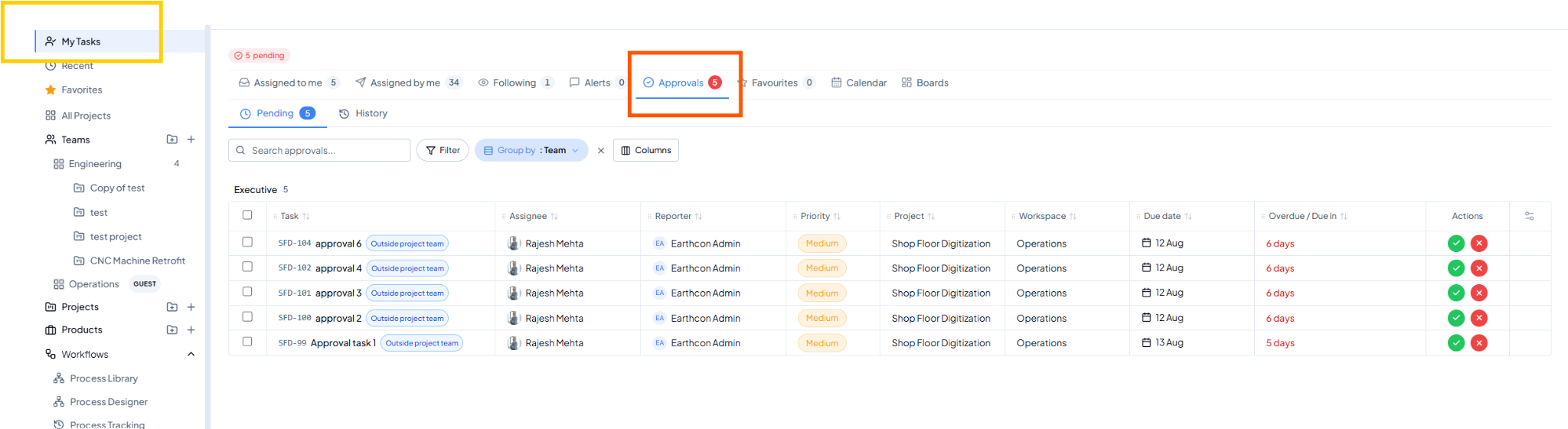 Approvals view showing Pending approvals and Approve/Reject actions.
Fields on this page
How to use it
1
Open Pending approvals
Go to My Tasks > Approvals > Pending.
2
Review the task
Open the task and review the work or information submitted for
approval.
3
Take the approval action
Use Approve when the work can proceed/close, or Reject when
changes are required.
4
Use History when needed
Open History to review approvals that have already been acted
upon.
Example
Five tasks from different projects are waiting for your approval. Use Approvals > Pending to process them from one consolidated list instead of visiting each project.