
Six moves take you from a sign-in link to your first completed task. Everything else in these guides hangs off one of these six.
1. The Journey at a Glance
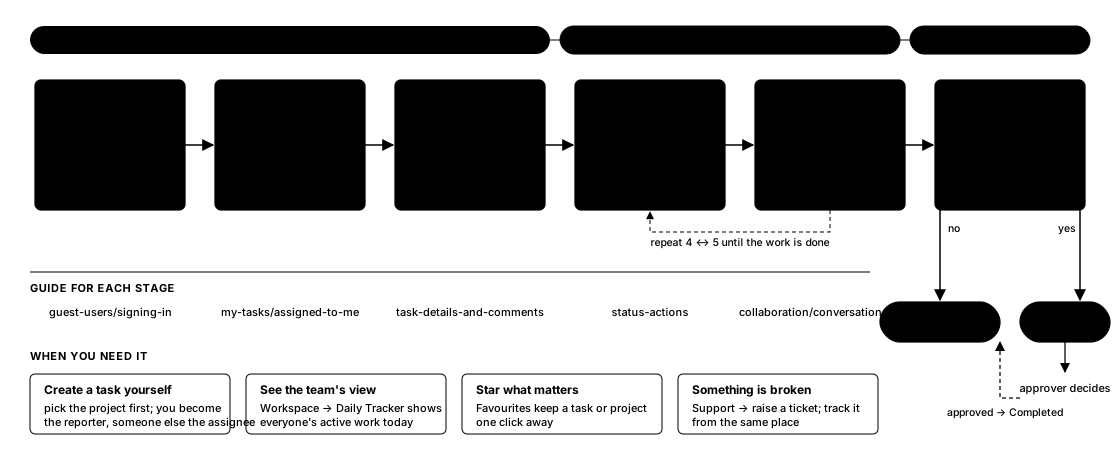 Your first week, from sign-in to your first completed approval.
2. Key Steps
- Status never changes on its own — move a task to In Progress when you start and to Completed (or Approval Required) when you finish.
- A task with an approval line cannot be closed until the approver approves; if you are both reporter and approver it auto-approves.
- My Tasks only shows tasks where you are assignee, reporter, follower or approver — it is a filter on the company’s tasks, not a separate list.
3. What to Expect Along the Way
- On Hold pauses a task without losing its place; Cancelled ends it without completing.
- If a task shows Blocked, another task must start or finish first — see Task Dependencies for which.
- Guest users see only the workspace they were invited to; the mobile app gives the same six stages on a phone.
4. Related Guides
- Understanding the Work Structure
- Using My Tasks
- Creating a Task
- Task Details and Comments
- Status, Actions & Troubleshooting — full reference for the statuses mentioned in this page
- Requesting Approval — the approval line/auto-approval behavior referenced in this page