
1. Boards
What is this?
Boards displays tasks as cards arranged by their current workflow status. Typical columns include Assigned, In Progress, On Hold, In Review, Approval Required and Completed.Why is this helpful?
- Get a visual picture of how work is progressing.
- See how many tasks are in each workflow stage.
- Identify work that is on hold, under review or waiting for approval.
- Use the board during status reviews when a visual workflow view is easier than a table.
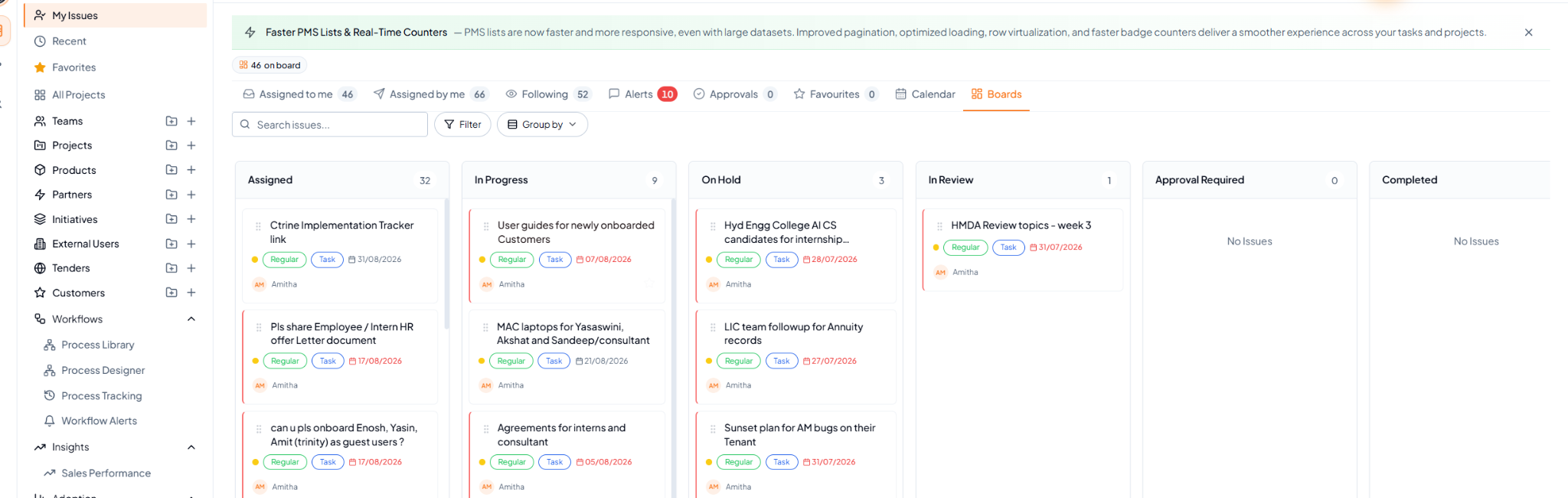 Boards view with tasks organised by workflow status.
Fields and controls on this page
How to use it
1
Open Boards
Select Boards from My Tasks.
2
Review the status columns
See where your current workload is concentrated.
3
Narrow the board if required
Use Search, Filter or Group By.
4
Open a task card
Select the task to review or update its details.
Example
During a daily review, the Board may show work spread across Assigned, In Progress, On Hold and In Review. This gives you an immediate visual understanding of where your tasks currently stand.