
1. Alerts
What is this?
Alerts brings together task-related comments or activity that may need your attention. The page can show summary indicators such as Mentioned, Unread and Needing Attention so that you can quickly identify items to review.Why is this helpful?
- See task conversations that need attention without opening every task.
- Find comments where you have been mentioned.
- Review unread task activity from one page.
- Respond faster to important task discussions.
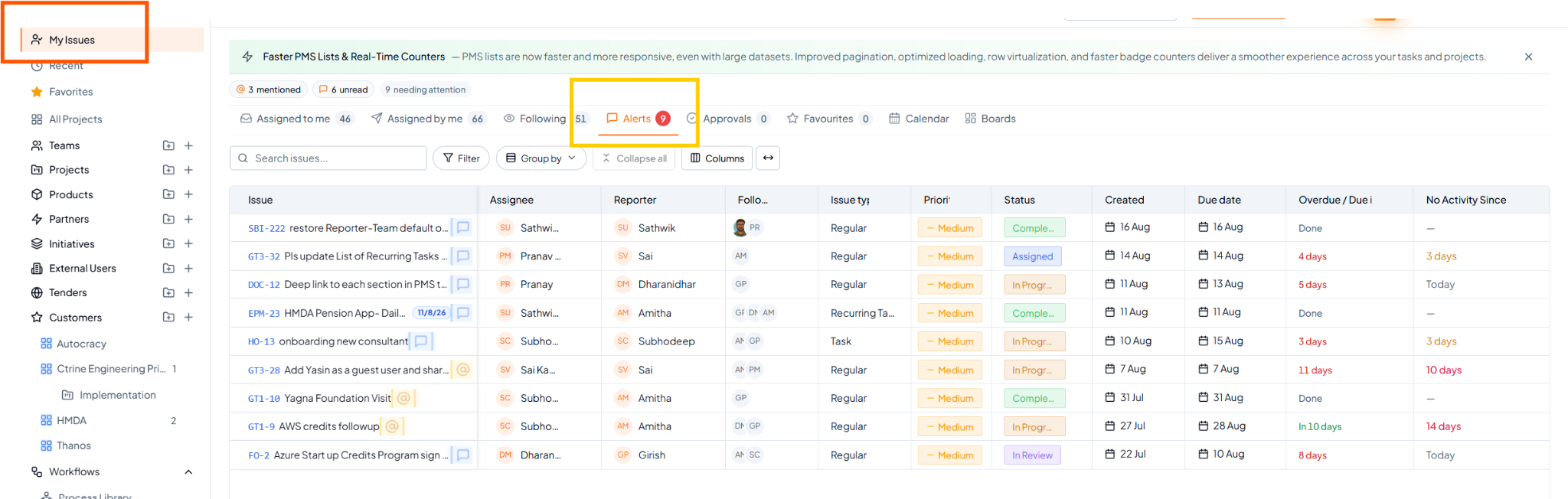 Alerts view with mentioned, unread and attention indicators.
Fields on this page
How to use it
1
Open Alerts
Select Alerts from My Tasks.
2
Review the attention indicators
Check Mentioned, Unread or other available attention summaries.
3
Open the relevant task
Select the task containing the comment or activity.
4
Read and respond
Review the discussion and respond or take action where required.
Example
You were mentioned in comments across several projects. Instead of opening each project, use Alerts to find the tasks where your attention is required.