
1. Assigned to Me
What is this?
Assigned to Me shows tasks where you are the Assignee and are responsible for completing the work. It is the main view for understanding your own pending workload across projects.Why is this helpful?
- See all work currently assigned to you across projects.
- Identify overdue tasks and tasks approaching their due date.
- Check task status, priority and recent activity before deciding what to work on next.
- Avoid opening several projects just to find your own tasks.
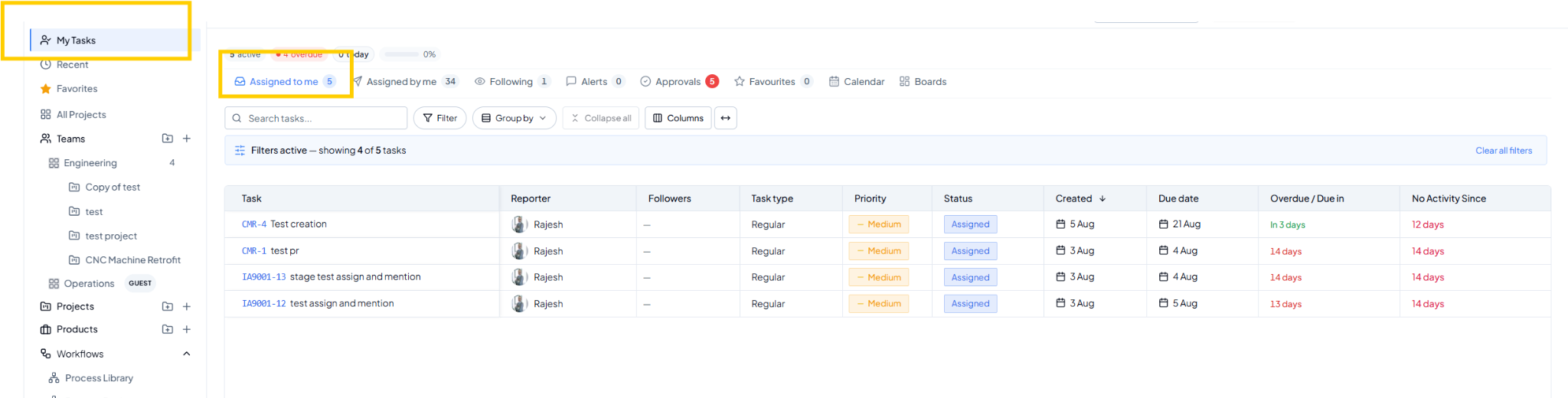 Assigned to Me view.
Fields on this page
How to use it
1
Open Assigned to Me
Go to My Tasks and select Assigned to Me.
2
Review deadlines
Check Due Date, Overdue / Due In and Priority to identify what
needs attention first.
3
Narrow the list when required
Use Search, Filter or Group By to focus on the tasks you need to
review.
4
Open and update the task
Select the Task ID or title and update the task as work progresses.
Example
You have tasks across HR, Customer Implementation and Operations. Open Assigned to Me to see them together, then filter Status = In Progress to focus only on active work.