
1. Assigned by Me
What is this?
Assigned by Me shows tasks that you have created or assigned to other users. You may not own completion of these tasks, but you may need to track progress and follow up.Why is this helpful?
- Track work delegated to other people from one place.
- See who currently owns each task.
- Identify delegated tasks that are overdue or inactive.
- Follow up without maintaining a separate manual tracker.
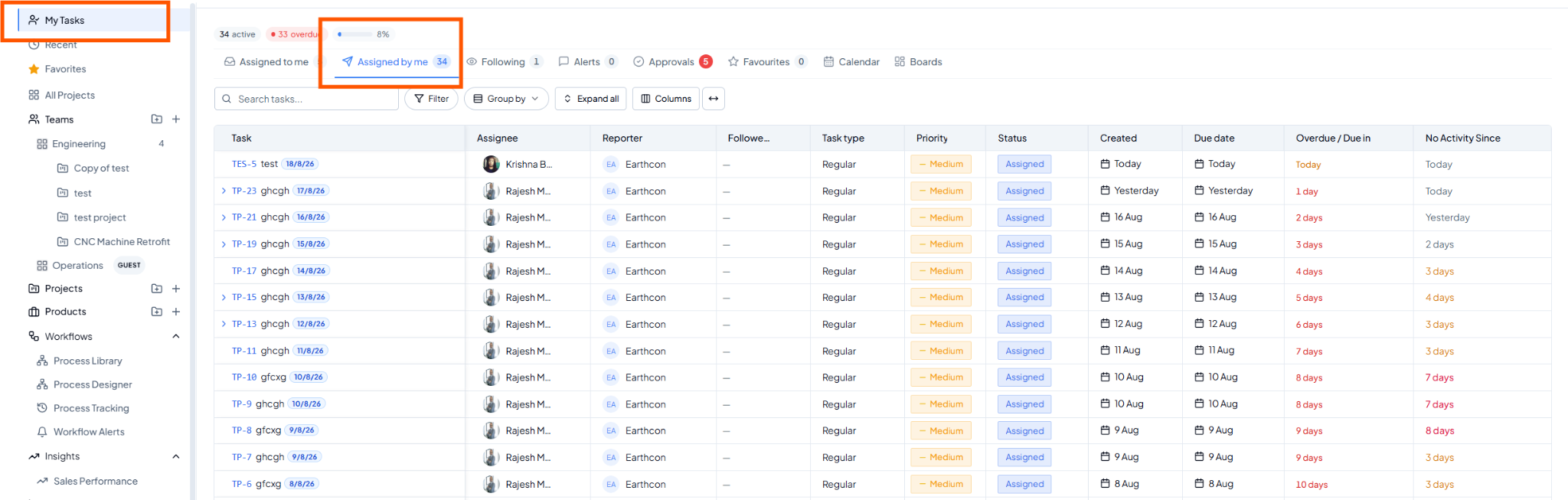 Assigned by Me view.
Fields on this page
How to use it
1
Open Assigned by Me
Select the Assigned by Me tab.
2
Check ownership
Review the Assignee to see who currently owns each task.
3
Identify follow-ups
Use Due Date, Overdue / Due In and No Activity Since to find tasks
needing follow-up.
4
Open the task
Select the task and add a comment or update details where required.
Example
You assigned ten onboarding activities to different team members. Group the list by Person to review what is pending with each person.