
1. Step 1 — Definition
The Definition step captures the common task details that will be reused each time the recurring task generates.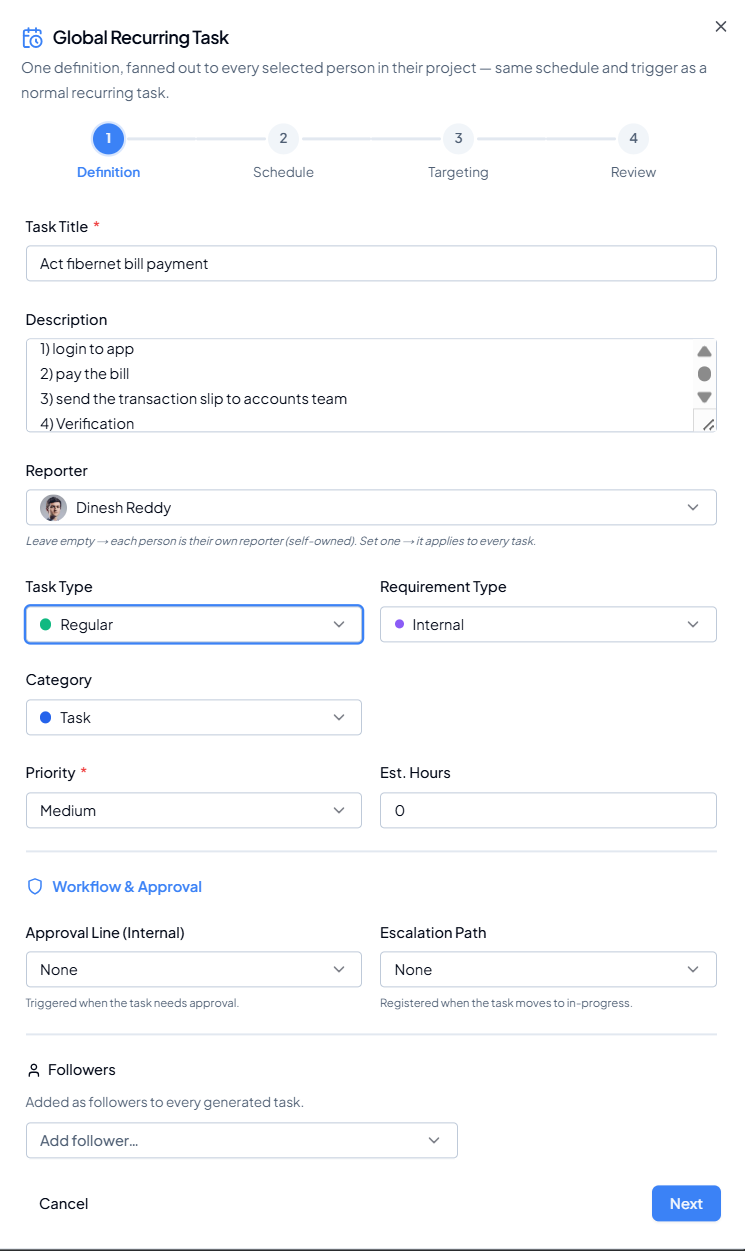 Definition step of the Global Recurring Task setup.
| Field | How to use it |
|---|---|
| Task Title* | Enter a short, clear, action-based title. This becomes the title of every generated task. |
| Description | Add the objective, step-by-step instructions, expected output and completion criteria. |
| Reporter | Leave empty if each generated task should be self-owned by its selected person. Set one reporter if the same reporter should apply to every generated task. |
| Task Type | Select the task type/workflow that should apply to the generated tasks. |
| Requirement Type | Select the requirement source/type, such as Internal. |
| Category | Select the relevant task category. |
| Priority* | Set the common urgency/priority. |
| Est. Hours | Enter the expected effort where required. |
| Approval Line (Internal) | Choose the approval line to be triggered when the task needs approval. |
| Escalation Path | Choose the escalation rule/path that should register when the task moves to In-Progress. |
| Followers | Add people who should follow every generated task for visibility/notifications. |
Definition best practice
Write the title and description so the assignee can understand the required action without needing separate context. Avoid putting dates such as “this Monday” in the description when the same text will repeat over many future occurrences.