
The 13 tabs inside an individual project, and the Overview tab’s quick view of overall status, progress, workload, and health.
1. Project Tabs at a Glance
Opening a project gives you 13 tabs across the top, each covering a different part of the project’s work. A quick way to find the right project tab before checking the full reference below.
See Quick Actions for the Import,
Team, Settings, Duplicate, and Move Workspace actions available from
the project header.
2. What Is the Overview Tab?
The Project Overview gives a quick view of the overall status, progress, workload, and health of a project. It helps users understand what is completed, what is still in progress, and where attention may be required.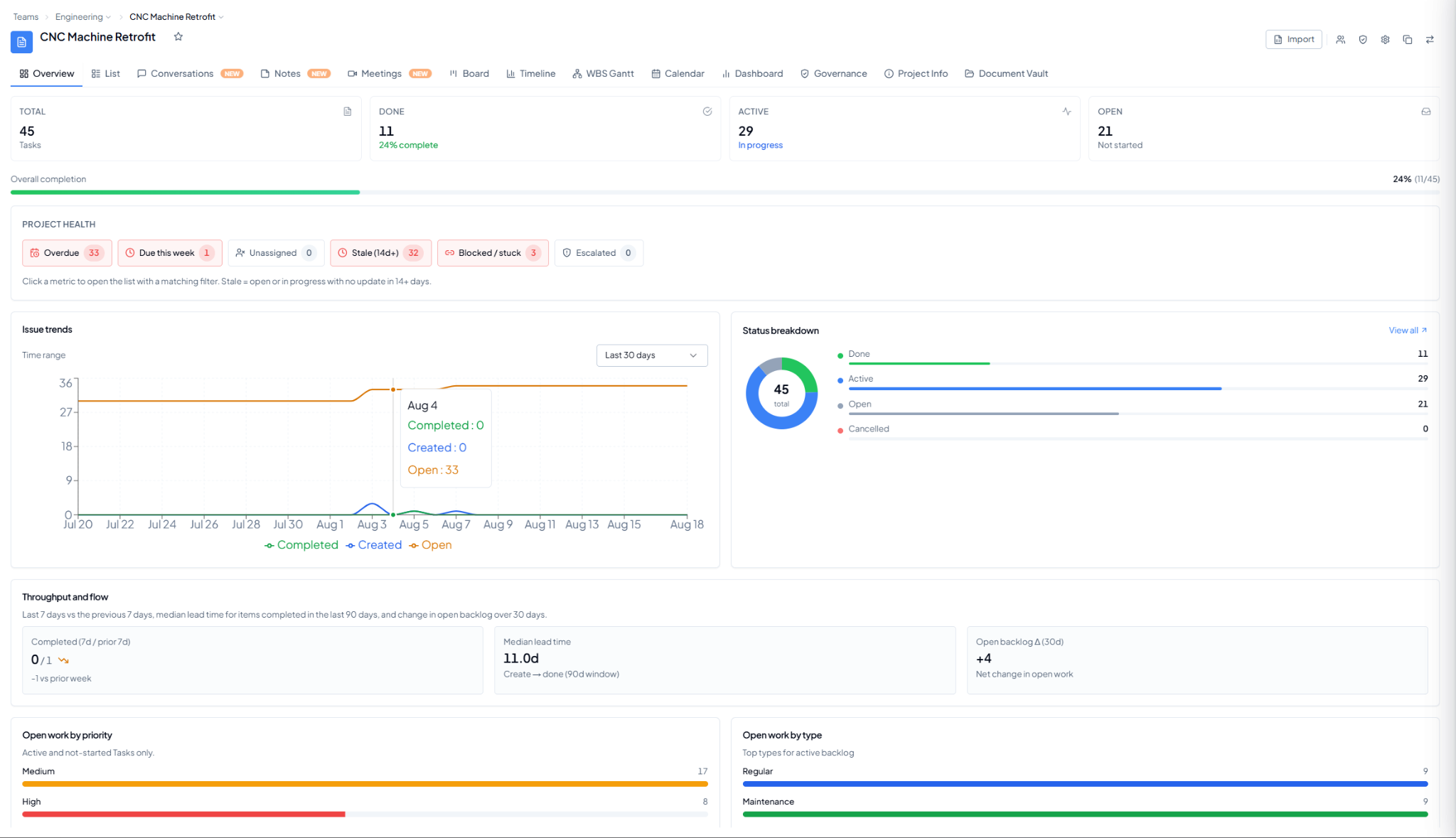 Project Overview showing progress, project health, trends, workload,
and delivery indicators.
Project Overview showing progress, project health, trends, workload,
and delivery indicators.
3. Overview Sections
4. Why Is This Helpful?
- Understand overall project progress at a glance.
- Identify pending and overdue work.
- Spot blocked, stale, unassigned, or escalated work.
- Review team workload and open work.
- Check whether completion is keeping pace with the project timeline.